Managing networks and paired devices
Firmware update
Casambi Pro for iOS indicates if there is a new firmware available for devices. The firmware can be updated from device’s properties.
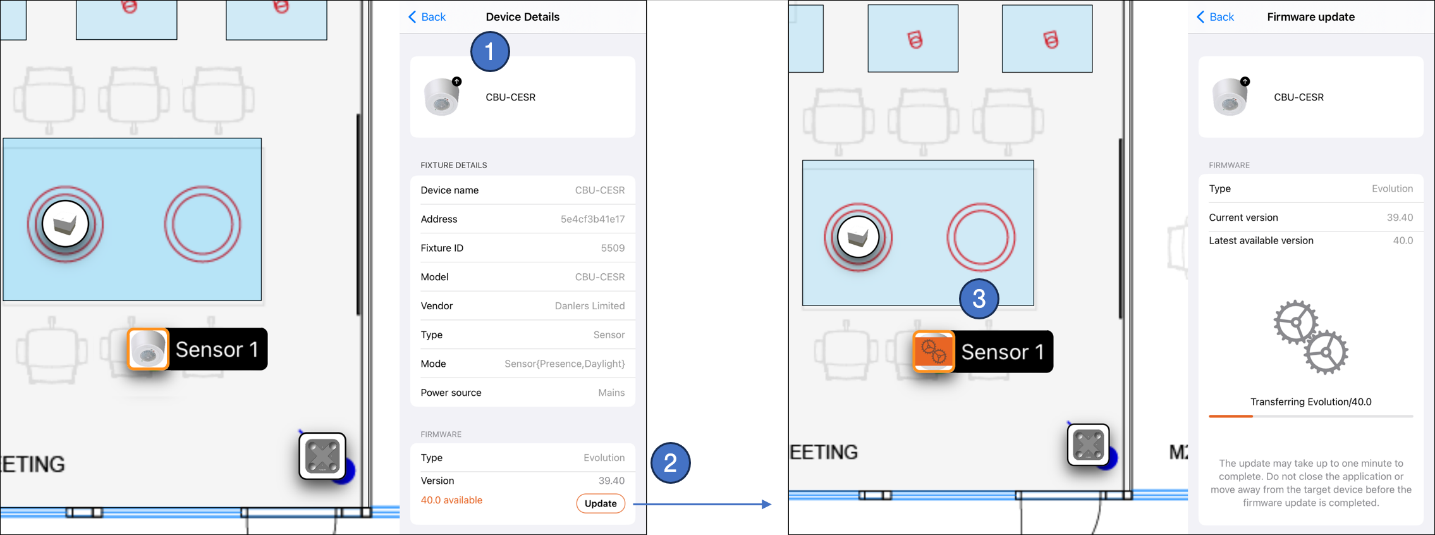
Updating the firmware for a device:
- Select a device from the project and look at its properties.
- The current firmware type and version are displayed in the Firmware section. If there is a new firmware version available and the device is within the Bluetooth range of the iOS device, the new version number and the Update button are visible.
Firmware update is started by tapping the Update button. - When the firmware update is in progress, it is indicated in the details pane and on the icon in the layout.
After updating one device in a network, the new firmware will then automatically flood the update to any other devices in the same network. All updated devices will indicate the process in the layout. The network is still usable during this time.