Luminaires
Casambi Pro for Windows
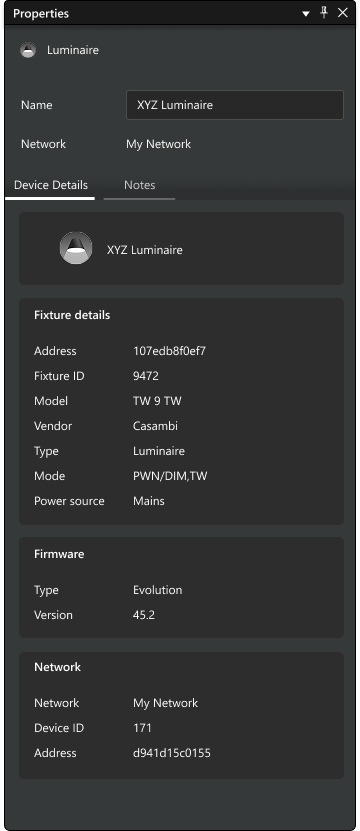
In Casambi Pro for Windows, luminaire properties become visible only after physical luminaires have been paired to a luminaire group. To view these properties, select a luminaire on the layout or within the Luminaires tab of the Properties pane.
- Editable Fields: Only the luminaire name and the notes field can be edited within the Windows application.
- Read-Only Data: All other technical properties and statuses are read-only and provided for informational purposes.
Casambi Pro for iOS
The iOS app provides real-time interaction and maintenance tools for luminaires that are not available in the Windows version of Casambi Pro.
- View current status, toggle power on/off, or identify devices by blinking it.
- Unpair or remove devices from the network.
- Perform firmware updates directly from the app (if newer firmware version is available).
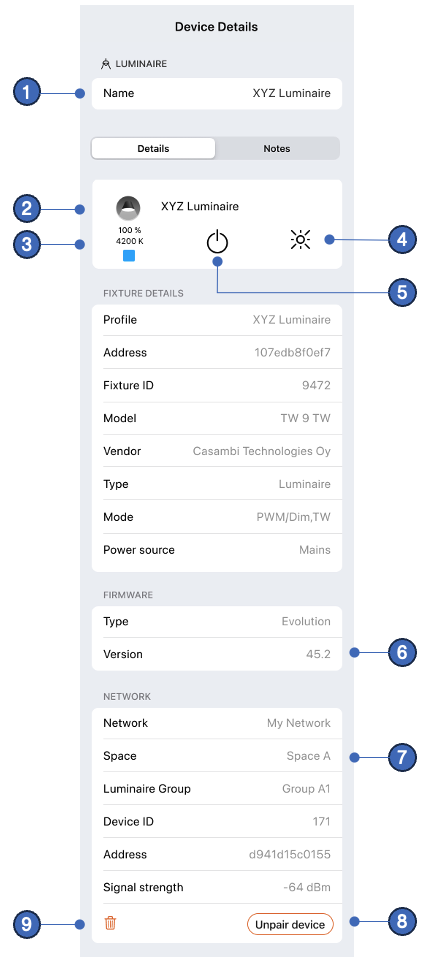
Device Details Overview
- Luminaire Name: Tap the name field to edit the name.
- Luminaire Image: Displays the image defined in the fixture profile.
- Current Status: Displays live data (e.g., dimming level) if the luminaire is within Bluetooth range. Values depend on luminaire capabilities.
- Identify Button: Causes the physical luminaire to blink. Tap again to stop.
- On/Off Toggle: Directly toggles the power state of the selected luminaire.
- Firmware Version: Displays the current version. An Update button appears if a newer version is available.
- Network Information: Shows the Network, Space and Group where the luminaire is located, and some
- Unpair Device Button: The primary method for detaching a luminaire from the network. This button is disabled if the network settings restrict unpairing.
- Remove Button: Removes the device from the network without unpairing it.
- Note: Use this option only as a last resort if a device is broken or unresponsive.
Luminaire groups
In Casambi Pro, a luminaire group is a container inside a space, for housing luminaires after they have been paired to networks. In the commissioning phase, each luminaire is positioned inside a luminaire group with Casambi Pro for iOS. Each luminaire group is joined in the same network as its parent space.
Find detailed information about groups in the Luminaire Groups page.
Details about how to pair luminaires to groups can be found in the Pairing Devices to Networks page.