Schedules
Schedule properties
The Schedule controller (also referred to as a Timer) enables the creation of automated schedules within a space. These can be configured to activate or deactivate scenes based on specific times, dates, or solar events (sunrise and sunset).

While a schedule object does not have a physical hardware location, it is represented within the layout by a selectable schedule symbol. Schedules are created using the same process as other controllers, as detailed in the previous chapters of this document.
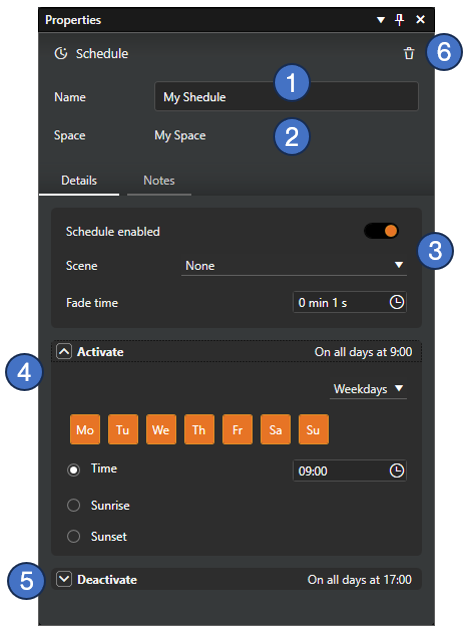
Schedule properties are largely consistent across both Casambi Pro for Windows and iOS. The available configurations include:
- Schedule Name (Mandatory): A unique identifier for the schedule.
- Space Assignment: The specific space to which the schedule belongs.
- General Settings:
- Enable/Disable: Toggle the schedule on or off.
- Scene Selection: Choose the scene to be triggered by the schedule.
- Fade Time: Define the transition duration for schedule activation and deactivation.
- Activation Parameters: Configurable triggers for starting the schedule (collapsible section).
- Deactivation Parameters: Configurable triggers for ending the schedule (collapsible section).
- Deletion: The schedule can be removed by clicking the Delete button (trash can icon) in the top-right corner of the property pane.
Deleting a schedule is currently only supported in Casambi Pro for Windows.
Schedule activation and deactivation settings
For both schedule activation and deactivation timing, users can choose from the following configuration options:
- Weekdays: Triggers the schedule on specific days of the week.
- Date: Triggers the schedule on a specific calendar date.
- After (Deactivation only): Sets a specific duration for the schedule to remain active before automatically turning off.
The Weekdays and Date timing configurations function identically in both the Activation and Deactivation sections.
- Weekdays
- Date
- After
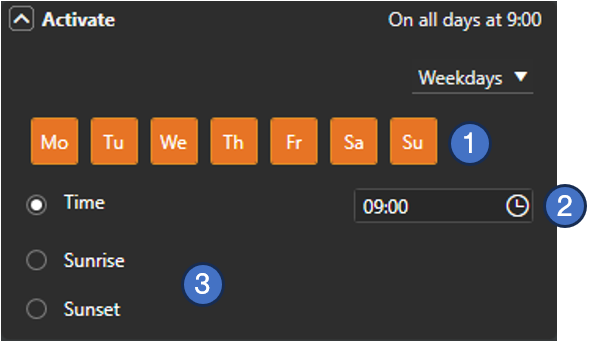
- Weekday Selection: Individual toggles to enable or disable specific days of the week for activation/deactivation.
- Time of Day: A precise setting to define the exact hour and minute the schedule should trigger.
- Solar Events (Sunrise/Sunset): As an alternative to a fixed time, triggers can be set to follow local sunrise or sunset.
To utilize Sunrise/Sunset triggers, the Network Location must be configured in the Project Settings. The location settings can only be defined in Casambi Pro for Windows .
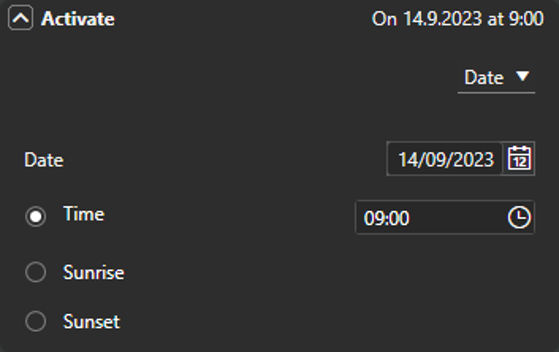
If the Date timing option is selected, the Date selection field is displayed in place of the weekday toggles.
- Date Selection: Choose a specific calendar date for the schedule to trigger.
- Time Settings: The Fixed Time, Sunrise, and Sunset settings function identically to the Weekdays configuration.
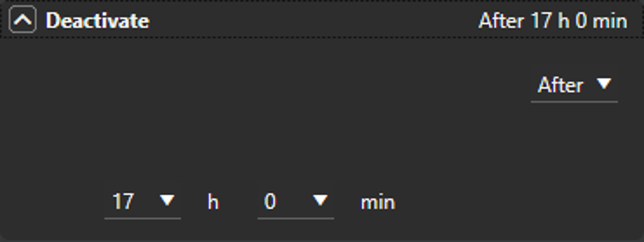
The After timing option is exclusive to the Deactivate settings. It allows a schedule to remain active for a predefined duration before automatically turning off.
- Duration Setting: When After is selected, a time input field becomes available.
- Available Range: The duration can be set anywhere from 0 h 0 min to 23 h 59 min.